Step one in getting my "this isn't going to cost me anything 'cause we'll just use open source and exising hardware" file server up and running is, of course, picking an appropriate operating system. I've always been somewhat agnostic in this area; I run a number of FreeBSD boxen, a couple of Macs, several Linux machines, and so forth. In the BSD world, I do have a decided preference for FreeBSD As for Linux, I used to use a distro called Tiny Sofa, but it appears to have gone into hibernation. Currently, I've been using CentOS, a repackaged version of Red Hat Enterprise Linux 4, without the subscription fee. (I did visit distrowatch.com to see what was "cool" these days, but decided that it's turned into little more than a popularity contest).
The hardware I want to work with is an elderly Compaq, with dual Pentium III processors, tons of disk space and a gig of RAM. While this might seem museum-quality gear to to uninitiated, please bear in mind that we'll be running this without the Redmond tax, and without the (massive) overhead required by Windows. In fact, we won't run any windowing system at all; everything will be set up via the command line. If we want a GUI of some sort for administration, we'll find an open source web service that fits the bill, and run it from there.
Anyway, back to the process of choosing an operating system. A primary consideration, of course, is maintenance. I don't want to even think about this machine once it is up and running. Thus, updates should be painless. Well, CentOS has a pretty simple to use update manager (typing "yum update" and hitting the "y" a couple of times is pretty easy). But it's very hard to beat the ports system in FreeBSD.
After a bit of research into hardware compatibility, reliability, etc., I could not come up with a compelling reason to go with one operating system over the other. What it finally came down to was this: I found the FreeBSD install CD before I located my CentoOS disks.
FreeBSD it is!
Saturday, November 04, 2006
Picking an Operating System


Friday, November 03, 2006
Replacing a Windows Fileserver
We have been using an elderly Pentium II with an ancient install of Windows NT Server as our primary backup and file server for quite some time now. I was considering simply retiring the box, and replacing it with a newer machine with Windows Server 2003 (some variation thereof), when it occurred to me that reading about the open source alternative, Samba, has been on my to do list for quite some time.
Why make Microsoft any richer, when there is a free alternative out there?
This would also give me a chance to try out rdiff-backup, a rather nifty open source back up solution with point-in-time recovery (i.e. restore this file/directory/whatever to the condition it was last Tuesday at 11:23 AM). That would be very, very helpful in my line of work.
The Goal: use existing hardware and free software to create a fully functional Windows compatible file server and turf the elderly NT server solution. At the same time, design and implement a set-and-forget, point-in-time recovery capable backup strategy that will regularly poll live servers and our internal network and back everything up.
I'm going to start reading now. I'll keep you posted.
Monday, October 23, 2006
Success!
This past weekend I finally found the time to assemble everything and give the dish/double biquad antenna a try, and it worked surprisingly well.
Here's how it went: first, I downloaded a copy of dd-wrt from http://www.dd-wrt.com, and used it to replace the built in OS on my Linksys WRT54G wireless router. It turned out to be a simple enough process, and took less than 30 minutes. By the way, it's amazing the additional functionality this replacement router OS offers -- even if you are not interested in building your own antenna, you should give this a look. It's a serious improvement.
Next, I removed one of the antennas from the router, and connected the router directly to the double biquad using a pigtail cable. I was preparing to hook the double biquad to a dish when I noticed that the router was already reporting more than a dozen available access points -- even without the dish!
This was phenomenal.
I browsed through the available access points to discover that the free wireless network I wanted to connect to was already showing up as available -- and this from inside my house, at my kitchen table. I Clicked on "Join" from within the dd-wrt admin tool, and lo and behold, I was suddenly connected to the internet. Admittedly, this was only a 1 meg connection, but I figured that would improve when I mounted the antenna to the dish, and put the dish on the roof. I made a note of the MAC address of the machine I had connected to so I could figure out just how far away the access point was.
Next, I mounted the double biquad onto the satellite dish. I decided to try the StarChoice dish first, as it was the largest, and I figured it would collect the strongest signal. Mounting was simple enough. I simply tore apart the LNB and then used a power drill and a wood screw to mount it to the plastic housing. That was simple. After I finished, it occurred to me that I should probably have taken into account the fact that I live in Canada, and we don't have the mildest of winters. So, it was off to the dollar store to see if I could find a microwave safe, watertight plastic container to cover the antenna. This turned out to be simple as well. Armed with a Xacto knife and a tube of silicone sealant, I proceeded to mount the assembly a second time, this time in a waterproof container.
An hour later I was up on the roof, and trying to point the dish where I knew there to be an access point or two.
It took some experimentation, but I managed to get a stable, relatively fast 4 meg connection to the wireless network in town.
Ah, the sweet smell of success.... and money saved.
Wednesday, October 04, 2006
Making the double biquad
I had some time last night, so I decided to make the actual double biquad part of the antenna. As I said in a recent posting, I used the ground wire from standard household electrical wiring. I used a permanent marker (the kind used to write on recordable cds) to mark out the location of the various bends. According the what I found online, each side of the "diamonds" should be as close to 30.5mm as possible.
At first, I tried using two pairs of pliers to make the bends as sharp as possible, but that didn't work very well. I then switched to using a vise: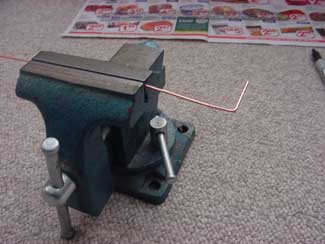

That worked much better. After a bit, I had something like this: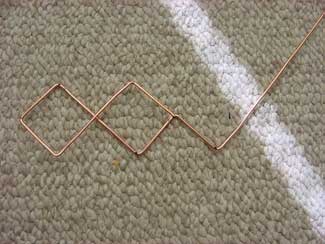
It took some effort, but I had it completed in about a half an hour. Now, I needed something to attach it to. I took the bit of 3/4" copper piping I got for free from a local hardware store and soldered it to my copper reflector plate. I also used a dremel tool to remove a few millimetres from one edge, so that the antenna would not touch it when it came up from the pipe. The result looked like this. Note the excess solder. I don't do this sort of thing often enough.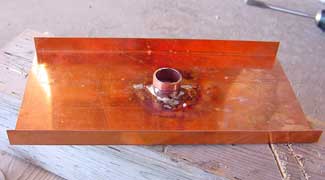
I then soldered a center post to the n-connector (which protruded through the center of the pipe), and tried to solder it to the finished double biquad. What a serious pain that turned out to be. After some thought, it occurred to me that I probably should have made the center post of the biquad part of the double biquad itself -- i.e., why snip it off when I could have simply bent it 90 degrees straight down. Also, I snipped the two ends that should have been soldered to the pipe a bit short, and soldering them to the copper piping turned out to be rather problematic.
I plan on trying this again. This time, I'll make the center post and the double biquad out of a single piece of copper, and leave the two "tails" that have to be connected to the pipe a bit longer than they need to be. I'll use the dremel to create two small grooves in the top of the pipe, lay the two tail ends in those grooves, and put a drop of solder on each. That should make things simpler.
Sunday, October 01, 2006
Biquad Wifi - making progress
I've come much closer to getting the antenna ready for trial. First, I've acquired a dish. This set me back the staggering sum of $10.00 + shipping from eBay. Just to be safe, I picked up one for nothing from a yard sale, just moments before it closed, as well. The first (pictured below) is a Dish Network model; the second is an elliptical model. I'll try both, and go with the one that has the stronger signal.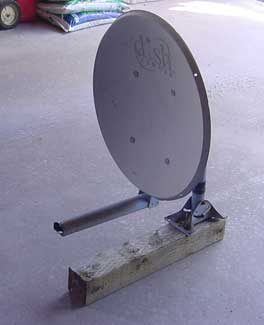
Next, I picked up some 15mm tall 3/4" copper piping from a local hardware store. They actually didn't even charge me for these, which I thought was very kind of them.
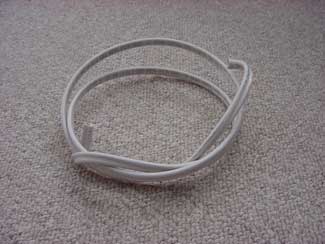
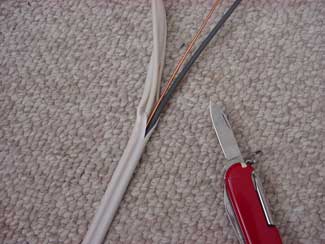
I picked up a few feet of standard household wiring out of the mess in my "don't throw this stuff away 'cause you might need it someday" box in my basement. Used my trusty pocket knife to open this up and extract the ground wire. That way, I don't have to strip the insulation off of the wire.