Showing posts with label voip. Show all posts

Tuesday, March 04, 2008

PBX in a Flash vs. trixbox

As promised, I have spent some time comparing the various benefits of PBX-in-a-Flash over trixbox. In a nutshell, my conclusion is relatively straightforward.


It's worth switching.

Why, you may ask? Well, the reasons are many and varied, but here are the high points:

1) Upgrades. If you've spent any time poring over the various email lists for trixbox, you will quickly come to realize that the general consensus with respect to upgrading trixbox is as follows: if it ain't broke, don't fix it. Upgrading trixbox can be a nightmare (something I've personally experienced), and the simplest solution is to either (a) live with an older version; or (b) do a clean install. Upgrading PBIAF, though, is really, really simple, and it actually works. Everything is web-based, wizard driven, and painless. In fact, the default installation regularly checks for both core and module upgrades, and offers to do it for you.

2) Extending functionality. PBIAF has a rapidly growing set of modules that are simple to install, and add nice functionality to the base system. Wait, you say -- so does trixbox! Well, yes, it does, but when it comes to installing and upgrading these modules, PBIAF is the hands down winner.

For these two reasons alone, it's worth the upgrade. 

Highly recommended.

Thursday, February 21, 2008

PBX in a Flash

Last week I downloaded and installed the new PBX in a Flash alternative to Trixbox. I have had excellent luck with Trixbox, and no real complaints, but I like to keep abreast of things, had some time on my hand, and thought I'd give it a whirl.

I am impressed.


Installation was simple, and it has all the functionality of Trixbox, and then some. Like Trixbox, it uses FreePBX for the actual management of the PBX, but unlike Trixbox, it runs on CentOS 5, and lacks the annoying "feature" of having all Zap functionality die if you happen to be running on a non-multicore CPU.

There are a host of modules already available, including some nifty text-to speech features, but I haven't had an opportunity to test those as of yet. I plan on doing so next week, just to see how things work.

One added bonus -- for some reason, PBX-in-a-Flash actually fixed one annoying problem I had with Trixbox: on my outbound trunk using Vonage, I often had problems with IVRs (when I was dialing the phone company to complain about another billing error, for example). The whole "press one for sales, two for tech support" etc. didn't work a lot of the time. Now it does.

That alone was worth making the switch.

Monday, December 17, 2007

Trixbox phones home?

Nerdvittles has an interesting post today -- apparently, trixbox phones home at 3:41 AM each day and gets a list of shell commands to run:

You may have read that a user discovered last week that current trixbox systems as recently as today include a remotely-configurable BOT, a software program that can execute certain commands locally once it receives its instructions. Reportedly, trixbox’s registry.pl “phones home” to Fonality via the Internet at 3:41 a.m. each morning to get a list of Linux commands to run. It then executes those Linux commands on your server while you’re sleeping. If the assertions of trixbox end users are true and we have no reason to believe otherwise, the existence of this remotely-configurable BOT had never been disclosed to unsuspecting users whether they were individuals or corporations. In fact, it doesn’t appear that even trixbox resellers were aware of the existence of the remotely-configurable BOT.
This is interesting, and disturbing. To be fair, the folks at Nerdvittles suggest that they "don’t for a minute believe that Chris Lyman and other senior management of Fonality knew about this in advance", but they certainly know about it now!

This is cause for concern. Since the ability to remotely execute shell commands exists, it's only a matter of time before someone else figures out how to exploit it.

Maybe it's time to accelerate my testing of pbx-in-a-flash....

Monday, November 12, 2007

Use the Linksys SPA922 as a Remote Extension

Last time I mentioned that I had used the Linksys SPA922 IP Phone as the "handset of choice" for phones. I also indicated that I wanted to have one as a remote extension -- i.e., it has a standard extension number, is part of the PBX system, can make and receive calls, etc., but is physically outside of the network.

This turned out to be relatively easy, once I figured out the firewall settings.

Setting up a remote extension using Asterisk/Trixbox is not that difficult, and consists of three basic steps:

1) Create the extension in Trixbox
2) Make some firewall modifications on the trixbox end
3) Plug in and configure the remote extension itself (i.e. the physical phone)

These steps are explained in more detail below:


Create the Extension in Trixbox
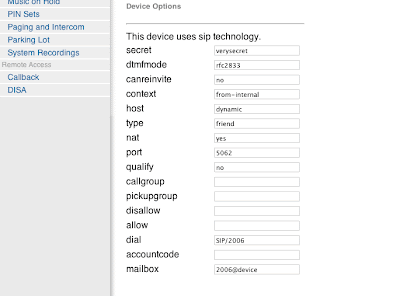
First we need to have an extension to play with, so we'll log onto our Trixbox installation using our favourite web browser, and choose "FreePBX" from the "Asterisk" menu. This pops up a new browser window (or tab) and allows us to create a new extension, among other things. Choose "Setup" from the top menu, then "Extensions" from the menu on the left, and create a new SIP extension. Fill in values similar to the ones below, substituting where appropriate for your information. For example, a "secret" of "verysecret" is probably not a good idea.
Make certain that you have "nat" set to "yes".

The only other thing we need to take care of within Trixbox is a tiny modification to the sip_nat.conf file. Again, we can do this using our web browser. Close the browser window with FreePBX running, and you should be back in the Trixbox admin window. Choose "Config Edit" from the "Asterisk" menu, and then scroll down until you find "sip_nat.conf". In a default installation, it is empty. Put in values like the following:
extern_ip=xxx.xxx.xxx.xxx
localnet=192.168.0.0/255.255.255.0
The first line, extern_ip, is the external (public facing) ip address of your Trixbox. Note that you probably don't have one, so instead put the public IP of whatever router, gateway, etc. you use to get access to the outside world.

The second line, localnet, describes the subnet that your Trixbox installation lives on.
Now, reload your configurations in Trixbox, and we are ready to configure our firewall.

Firewall Modifications

We need to make some modifications on the Trixbox end of the network (i.e. not at home, if that's where your remote extension is, but on the the end of the connection where your Trixbox PBX lives). Specific modifications will vary depending on what you are using for a router/gateway, but in general there are only a few things to change. I am using a Linksys machine as the external gateway, so I made changes as follows:
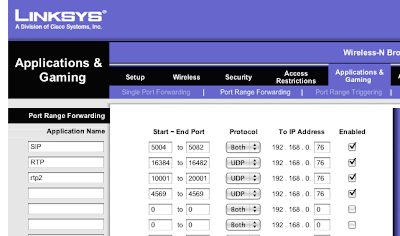

In essence, forward the following to your Trixbox machine:

5004-5082 udp
16384-16482 udp
10001 - 20001 udp
4569 udp (optional, and only for IAX2 units; ignore if you are just using sip)

Make these changes, and we are ready to set up the phone itself.


Configure the SPA922 IP Phone
As before, I simply unpacked the phone, found a place for it on my desk at home, and plugged it in. After a few seconds, it found itself an IP address and did its best to find dial tone. Naturally, it failed, but I did appreciate the effort.

All configuration on the SPA922 can be done with a web browser... but you need to know what IP address to connect to. After it has powered up, click on the "menu" button on the handset. It looks like a dog-eared piece of paper, just below the voice mail button. Now use the navigation button (big circle with four arrows) to scroll down to Network, and click the select soft button (leftmost, just below the LCD. Its label is part of the LCD). You'll see your phone's IP address displayed on the LCD. Mine was set to 192.168.2.149.

So, fire up your web browser, and go to http://192.168.2.149, or whatever IP address your phone has. You'll see the Linksys screen. Click on "Admin Login" in the upper right hand corner, then "Advanced." Note that by default the phone ships with no password for the admin tool; please remember to change that at some point (like right now).

Click on the Ext1 tab, and scroll down to NAT Settings. Set NAT Mapping Enable and NAT Keepalive Enable to "YES". Scroll down to SIP Settings. Set SIP Port and Ext SIP port both to 5062.

Next scroll down to the "Proxy and Registration" section. Set "Proxy" and "Outbound Proxy" to the external IP address used by your Trixbox machine. Set "Use Outbound Proxy" and "Use OB in Dialog" to "Yes".

Scroll down to Subscriber information, and set User ID to the extension number for your phone, and password to whatever "secret" you set up in Trixbox for this extension.

Now scroll down to Audio Configuration. Set DTMF Tx Method to "Inband+INFO". (Note: I had to do this to get most IVRs to work, i.e. when I call someone and have to press 1 for this, 2 for that, and so forth. YMMV).

Click on "Submit all Changes."

Now, go to the SIP tab. Scroll down to RTP Parameters. Set RTP port min to 16384. Set RTP port max to 16482. Now, scroll down to NAT Support Parameters. Set Handle VIA received, Insert VIA received, Substitute VIA address, Handle VIA rport, and Insert VIA rport all to "Yes."

Save your changes, and in a few moments, you should be able to make calls!

Sunday, October 21, 2007

Alternative to Trixbox coming soon

The folks over at nerdvittles.com have an interesting project in the works -- PBX in a Flash. Apparently they (and others) are getting a bit fed up with the direction that Trixbox is taking; on the nerdvittles site, the authors put it this way: "suffice it to say that it’s just gotten a little too proprietary, too closed, and too commercial for our open source, puritanical tastes."

So they decided to take matters into their own hands, and are working on something called "PBX in a Flash". From the site:


Our up front promise is to keep the project open, participatory, reliable, and fun. After all, that’s what the Asterisk revolution was and is all about. The plan is to provide a free ISO-based offering for home or office use that will run on a dedicated Linux machine. There also will be a VMware image that will run on a Windows desktop. And, for the Mac desktop, we’ll provide both a VMware and a Parallels image.

I'll be interested to see where this goes, and intend to give it a try.

Friday, November 24, 2006

Replace your phone service with Skype

The folks over at Linuxjournal.com have a nifty how-to guide for replacing your PSTN phone service (that's Public Switched Telephone Network, for people like me, who are still new to this whole VOIP thing) with a Skype based solution.

This is rather slick...

The author claims that his "solution was to build a Skype server that provides 24/7 phone service with the minimum of hassle and fuss. By dumping your regular phone company and taking back control of your home phone wiring using a Skype server, you will have not only a phone system with nearly the same capabilities as before-indeed, in some ways better-you will also save a bundle of money! In my case, I save a little less than $700 US each year (this year, next year, and the year after that, and so on), or about 82% off of my old phone bill."

Hmmm... 82% is a lot of dough.

Update:
Darn. The SkypeIn service (details on the Skype website) is not yet available in Canada. Well, it is, but my next door neighbours would have to call a number in some other country to get me... and that's not going to happen.

Oh well.

Tuesday, November 21, 2006

Interesting Add On for Asterisk

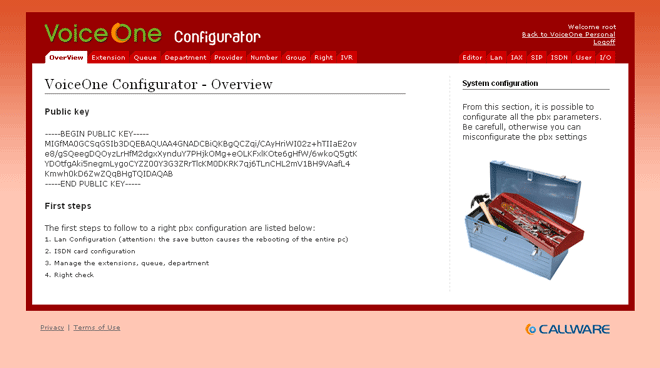
While planning for my Asterisk install, it occurred to me that someone has almost certainly already built and released an open source project for web based administration of the server. While I have by no means completed my research into this topic, I did stumble across a very nice package called VoiceOne. This seems to be almost exactly what I will need.

Here is a sample screenshot of the application. It looks very promising.

Asterisk update

I've been doing some more reading about the hardware requirements and options for setting up an Asterisk PBX, and came across this information:

"If you build an Asterisk system without the need for PCI cards, you have a much greater set of choices for what kind of computer to run Asterisk on. If things are configured correctly, the ATAs are handling all of the load for coding/decoding digitized streams of voice to/from analog. You have a better chance of being able to successfully share a computer for asterisk and some other tasks. There are some great choices in small form factor computers. It's even possible to run Asterisk on a Linksys WRT54GS, but that box is a bit too underpowered for a full featured Asterisk configuration. Linksys also sells ATAs with firmware from Sipura. Now it's been announced that Linksys is buying Sipura. I haven't seen any reports on hacking the version of the WRT54G with the embedded ATA yet, but I'm hoping we might see some pretty cool things soon."

Please note that I fixed some spelling errors in this prior to putting it here. I can't help it; the English prof in me takes precedence over the nerd from time to time. Anyway, it sounds a lot like the external box (i.e. the Linksys - Sipura SPA-3000) might be a better solution given that I'm using older hardware for my home installation of Asterisk. After a bit of browsing, I found an excellent price on one here, in Canada. I'm tempted to try this using my Linksys WRT54GS router, but since that's currently connecting my antenna to the Internet, I might be asking it to do more than it can.

Monday, November 20, 2006

Planning the Asterisk Install

After reviewing the basic instructions found here, it would appear that I need to purchase PCI cards with Foreign eXchange Station (FXS) ports, and with Foreign Exchange Office ports. Telephones are connected to the FXS ports, and phone lines are connected to the FXO ports.

Apparently bad things happen if you get this wrong. FXS ports provide power and generate ring signals, while FXO ports receive power and ring signals. I'll have to be careful with that.

I'm also going to need an Analog Telephone Adaptor, or ATA, that acts as a gateway between my digital network (the Asterisk box) and plain old analog phones and phone lines. Fortunately, the most common ATAs offer FXS ports, so there is less hardware to buy (and money to spend).

Apparently there has been considerable success using the TDM400P with a couple of daughter cards for a self contained PC to handle everything. Or, we could go with the Sipura 3000 (a stand alone box that you connect your Asterisk machine to via ethernet). I guess it all comes down to price.

Pricing out the first option, the Digium TDM400P, doesn't look too bad. I found a decent price here, at voipdepot.ca.

My, what a wonderful new crop of acronyms to learn. I connect from the CO to my FXO, then go through my ATA to FXS to connect to a phone and get dial tone. What fun.

Sunday, November 19, 2006

Why install Asterisk at home?

I've had a number of people ask me why I would be interested in installing Asterisk PBX at home. Well, there are a number of reasons. First, I pay for voice mail and a few other features on my home phones, and it costs me a bit of cash every month. The PBX will pay for itself inside of a year. The main reason, though, is functionality. Here are some of the features that are of interest to me:

  • Sophisticated Voice Mail system - This can provide a mail box per person, that can be deliver notification by e-mail. Web based access to your voice mail is also available.
  • Interactive Voice Response IVR system - You can present callers with a menu, which can be particularly useful if you have more people in the house than you have incoming phone lines. "Press 1 for Him, Press 2 for Her, Press 3 for Kid No. 1, Press 4 for Kid No. 2"...
  • Control over which phones ring, and at what times.
  • Functions as an Intercom - Place in house calls.
  • Call routing - Route incoming calls by Caller ID.
  • Multi-line functionality - if you need more than 2 incoming lines, you will quickly discover that phones that handle more than two lines are much more expensive than 1 or 2 line phones, and there isn't very much selection available.
  • Call Detail Reports - for attempting to gain some control over costs, and/or teenagers, etc.
  • Check your voice mail over the web.
  • Email notification of voice mail.
There are many more features, but even this brief overview shows the kind of control you can have.

Plus, it's cool. And although I do hate to admit it, there is a fairly wide "geek" streak in me. It rears its ugly head sometimes.

Saturday, November 18, 2006

Progress with Asterisk

Asterisk logo
I've made some progress with my Asterisk PBX planning. As I indicated earlier, I had to do a re-install of the operating system on my backup server (From FreeBSD to CentOS) first, and I've managed to get that out of the way. I've also developed a strong appreciation and respect for the "yum" package manager. It's very good, and as easy to use as ports on FreeBSD.

Anyway, I've begun the work necessary to build a simple PBX system at home, using Asterisk. I figure I'll practice at home, and if it works well, eventually migrate my business onto the same system. At this point, it's largely reading and research, as I have to (gasp) actually purchase some hardware in order to make this work.

Apparently, I'm going to need a PSTN interface card.

For those not in the know (like me, up until recently), PSTN stands for Public Switched Telephone Network. Also, POTS is Plain Old Telephone Service. And in case you were wondering, PBX stands for Private Branch eXchange. Wikipedia has some great info on the history of the PBX.

I'm sorry for the digression.

A PSTN interface card is the basic device that permits you to connect analog or digital phone lines (the ones that you use at work or at home to connect regular phones to) to your PBX. Once you've done that you have access to all the nifty features that Asterisk offers, such as call parking, voice mail, and so forth.

There is a helpful site found here that details all of the various cards known to work well with Asterisk. I'm going to have to do some serious price comparison for awhile, and find one known to work well with my system.

This is going to take awhile.

Thursday, November 16, 2006

Asterisk - VOIP for the handyman

While configuring my backup server, it occurred to me that this would be an ideal time to try working with Asterisk, the free VOIP solution available for Linux. Naturally, this entails re-doing much of what I have already done with Samba, as I chose FreeBSD as my operating system. I'll have to strip it and go with CentOS instead. Sigh.

The Asterisk site claims that Asterisk is a complete PBX in software. It runs on Linux, BSD and MacOSX and provides all of the features you would expect from a PBX and more. Asterisk does voice over IP in many protocols, and can interoperate with almost all standards-based telephony equipment using relatively inexpensive hardware. However, my research has indicated that it runs best on Linux, so Linux it is.

I'll keep you posted. And this time I'll take notes.